Creator portal · approved creators only
Your journey, all in one place.
Onboarding, your LIVE Creator Diploma training, your performance and your 90-day Rookie journey to graduation, in one place.

Welcome to We Belong
Complete your onboarding
We Belong Network is an official TikTok LIVE partner. That means that as well as joining us, every We Belong creator must also be onboarded by TikTok itself. Complete all three steps below. Your portal opens once they’re done.
0 of 3 steps complete
Your contact details
✓ SavedSo your talent manager can reach you and set you up correctly. We’ve filled in what you gave us on your application, so just check it and add the rest.
Get onboarded with TikTok
✓ Opened- Open the link on the phone you use for TikTok, signed in to the account you gave us.
- On the We Belong Network page, tap to apply and complete every step TikTok shows you.
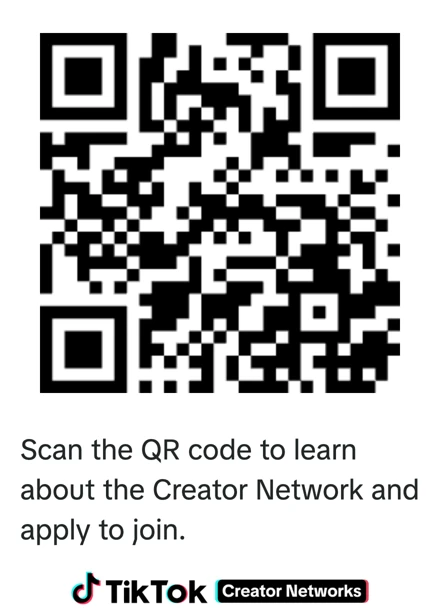
On a computer? Scan this in the TikTok app instead: open TikTok, go to Profile, then Add friends, then Scan.
Complete TikTok’s verification checks
✓ DoneThis is required by TikTok. As part of your application, TikTok must verify your identity and age (its KYC checks) before it will approve you. Have your photo ID ready and complete every step TikTok shows you in the app. TikTok will not approve your application until this is done.
New age verification (only if you haven’t verified your age on TikTok before): submit TikTok’s age verification form using the button below.
TikTok then reviews your application. We’ll confirm in your portal as soon as TikTok approves you.
LIVE Creator Diploma
Getting Started on TikTok LIVE
This module welcomes you properly to We Belong, then helps you get ready for your first LIVE and get more confident every time you go LIVE.
Watch the welcome video first (3 minutes), then read through the sections below.
1Welcome to the We Belong family
We’re so glad you’re here. We Belong Network is a UK social media talent network built around respect, individuality and real connection, and we’re an official TikTok LIVE partner. We see the person behind the profile, and we’re here to help you grow your confidence, your community and your career.
- A talent manager who mentors you and agrees your goals with you
- This LIVE Creator Diploma, built by us for our creators
- Collabs, PK battles and TikTok campaigns with other We Belong creators
- A supportive community that celebrates your wins
- Regular feedback on your performance from TikTok Backstage
- Be yourself. Your personality is what people come back for
- Go LIVE regularly, on the schedule you agree with your talent manager
- Follow TikTok’s Community Guidelines, every time
- Keep in touch with your talent manager and tell them if you’re struggling
- Represent We Belong positively, on and off LIVE
“Being part of We Belong means you never go LIVE alone. We’ve got your back.”
2Looking back at your first LIVE
Well done, you did it! Most people find their first LIVE a mix of exciting and awkward, and that’s completely normal. Take two minutes to think about these:
- What felt good? A comment that made you smile, an effect you liked, a moment you relaxed.
- What felt awkward? Silences, not knowing what to say, or nobody joining at first.
- What will you try next time? Pick just one thing.
Share your answers with your talent manager at your next catch-up. Small improvements each LIVE add up quickly.
3The controls, in more depth
Before and during a LIVE you can open your settings to shape the experience. These are the ones worth knowing well:
Your title is the first thing viewers see. Keep it short and specific, such as “Q&A: ask me anything” rather than “hanging out”.
Use them to add fun and personality, but don’t let them hide your face or distract from the conversation.
You can filter comments, or turn them off, before or during a LIVE. Most of the time you’ll want comments on, because they’re how your audience talks to you.
Add words you don’t want in your chat and comments containing them won’t show. Set this up before you go LIVE.
Choose someone you trust to help manage your chat. Moderators can mute or remove people so you can focus on your LIVE.
Always use the end button and confirm, rather than closing the app, so your viewers aren’t left on a frozen screen.
4Building your LIVE routine
- Be consistent. Going LIVE at regular times helps your audience know when to find you. Agree your schedule with your talent manager.
- Plan a little. Jot down three things to talk about before you start, so you never run out of ideas.
- Open strong. Start with what your title promised instead of waiting for people to arrive.
- Check your set-up. Good light on your face, a quiet space, a steady phone and a strong signal.
- Look at your summary. After each LIVE, check how many people joined and when they left. It tells you what to keep and what to change.
5Growing from your second LIVE onwards
- Welcome everyone by name. People stay when they feel noticed.
- Ask questions. A direct question every few minutes gets quieter viewers talking.
- Remember your regulars. Recognising returning faces builds your community.
- Thank people genuinely. Never pressure anyone to send gifts. Warmth and good content are what keep people coming back.
6Staying safe
- You can mute or block anyone who’s unkind. You never have to engage with them.
- Use keyword filters and a moderator so your chat stays positive.
- Never share personal details such as your address, school, workplace or where you are right now.
- If anything worries you, during or after a LIVE, tell your talent manager straight away. That’s what we’re here for.
✓Quick check
Answer all five to complete Module 1. You can try again as many times as you like.
🎉 Onboarding complete: here’s what happens next
Thank you! We’re now sending your onboarding details to TikTok for review. We’ll confirm your next steps within 24 hours and email you, so keep an eye on your inbox (and your junk folder).
- 1Onboarding completeDetails, TikTok application and verification checks done.
- 2TikTok reviewWe’ll email you your next steps.
- 3Your invitationSent to your TikTok account, with 48 hours to accept. Never been LIVE? You’ll do a 30-minute LIVE trial first.
- 4Accept, and you’re inAccept in TikTok, tell us here, and we’ll confirm you’re officially part of We Belong.
Complete your 30-minute LIVE trial on TikTok
✓ Done 🔒This video unlocks when we send your LIVE trial invitation
Watch this first (2 minutes, sound on): it walks you through your trial step by step.
🔒 Only if you’ve never been LIVE on TikTok. This unlocks when we send your trial invitation to your TikTok account. Nothing to do yet.
We’ve sent your LIVE trial invitation to your TikTok account. TikTok needs this before you can join us. Open TikTok, accept the invitation from We Belong Network in your Inbox / messages, then go LIVE for a solid 30 minutes before the deadline above:
- Play around and get a feel for the features and animations.
- If anyone joins your LIVE, just say hello and get to know your audience.
- When the 30-minute timer is up you can end your LIVE, or if you’re enjoying it, stay on as long as you want.
Quick guide: your first LIVE
Starting your LIVE
- Open TikTok and tap + at the bottom of the screen.
- Swipe across to LIVE.
- Add a short title (TikTok allows about 32 characters), for example “My first LIVE, come say hi!”
- Tap Go LIVE, then start your timer below.
Handy while you’re LIVE
- Tap the three dots (…) to flip your camera, try effects and stickers, and manage comments.
- If someone’s unkind, tap their name and mute or block them. You don’t have to reply.
Easy things to say
- “Hi, welcome in! This is my very first LIVE.”
- “Where are you watching from?”
- “I’m just trying out the features, tell me what I should test next!”
Finishing
- Tap the end button at the top of your screen, then confirm. Ending properly matters, because if you just close the app viewers can be left looking at a frozen screen.
Trial done, brilliant! Your We Belong invitation is on its way to your TikTok account. Watch this now so you know exactly how to accept it when it arrives:
Accept your We Belong invitation on TikTok
✓ DoneWatch how to find and accept your invitation in TikTok (70 seconds, sound on).
We’ve sent your invitation to your TikTok account. Accept it before the deadline above, or TikTok cancels it.
- Open TikTok and go to your Inbox / messages.
- Find the invitation from We Belong Network and tap Accept.
- Come back here and tell us it’s done.
Can’t find the invitation in your messages?
- Go to your Profile and tap the menu (☰) at the top right.
- Tap TikTok Studio.
- Open the LIVE tab in Creator tools, then tap Creator Network Center.
- Tap View how to join and follow the steps. Your invitation from We Belong Network will be there to accept.

Thanks! You told us you accepted it on . Your talent manager is checking with TikTok and will confirm it here shortly.
Your onboarding details are with TikTok for review. We’ll confirm your next steps within 24 hours and email you, then send your invitation to join We Belong Network to your TikTok account. Accept it as soon as it arrives, and your talent manager will confirm it here.
🔒 Your invitation hasn’t been sent to your TikTok account yet. We’ll confirm your next steps within 24 hours. As soon as we’ve sent your invitation to your TikTok account, this step unlocks and we’ll email you.
Thanks! You told us you accepted it on . Your talent manager is checking with TikTok and will confirm it here shortly.
1. Onboarding
Your first steps with We Belong
2. Your LIVE commitment
Part of your Diploma and graduation
You decide your level of commitment. Here you’ll choose which days and times you go LIVE each week, built around your life. Your mentor unlocks this once you’ve accepted your TikTok invitation.
Plan the days and times you’ll go LIVE every week. Your mentor (your talent manager) will go through it with you and agree it. Sticking to your agreed schedule counts towards graduation and your Diploma.
How to fill it in
- Tap each day you’ll go LIVE. It turns green.
- Set your start and end time for that day. Choose times you can keep every week, around work, college or family.
- Going LIVE twice in one day? Tap “+ Add another time”.
- Check your totals under the days: your total hours a month and how many days they’re spread over. Both need a green ✓.
- Add your 90-day goal, tick the commitment box and submit.
See example schedules
Mon, Wed and Fri
7pm – 9pm
≈ 24 hours a month over 12 days
Tue 8pm – 10pm
Sat 2pm – 5pm
Sun 6pm – 8pm
≈ 28 hours a month over 12 days
Sat and Sun
7pm – 9:30pm
≈ 20 hours a month over 8 days
Sun only
8pm – 10pm
≈ 8 hours a month over 4 days
Times are when you’re actually LIVE. Plan longer sessions on fewer days, or shorter ones on more days, whatever suits you.
Your weekly schedule
3. Training: LIVE Creator Diploma
Modules unlock one at a time as you finish each one
4. Your performance
Updated by your talent manager from TikTok Backstage
Your first performance update will appear here after your talent manager's next Backstage upload.
5. 90-day Rookie journey
Your talent manager confirms milestones from your TikTok Backstage results. Targets are agreed with you individually.
Congratulations
You've graduated 🎓
You've completed onboarding, your agreed LIVE schedule, your LIVE Creator Diploma and the 90-day Rookie programme. Welcome to the next chapter with We Belong Network.